

visionOS app development in 2026: what sells on Vision Pro, RealityKit basics, enterprise training use cases, and honest cost numbers.

visionOS app development in 2026 is a niche with real money in it: enterprise training, medical visualization, and high-consideration retail. The consumer market is still small, so the winning move for iOS teams is a focused spatial app that solves one expensive problem, built with SwiftUI and RealityKit over 4-8 weeks.
That is the short answer. The longer answer involves some uncomfortable honesty about headset volumes, a genuinely new interaction model, and a 3D asset pipeline that quietly eats budgets. This guide covers all of it.
Two years after Apple shipped the Vision Pro at $3,499, spatial computing has settled into a clear shape. It is not the next iPhone moment yet. The installed base is a fraction of iOS, and consumer app revenue reflects that. What has happened instead is quieter and, for the right teams, more profitable: enterprises adopted the device for training, simulation, and visualization, where a headset that costs as much as a workstation is a rounding error next to the problem it solves.
That changes the math for visionOS app development. On the iPhone App Store you compete with two million apps for users who expect free. On visionOS you compete with a few thousand native apps for buyers who write five and six figure checks. Fewer users, better users.
We track this shift the same way we track everything else in mobile. If you want the wider view of where the platform economy is heading, our breakdown of mobile app development trends for 2026 puts spatial computing in context next to on-device AI and app-store policy changes.

Both, depending on what you build. Here is the honest read.
The consumer mass market is not there. A $3,499 entry price filters out casual buyers, and most people will not wear a headset to check email. If your plan is a consumer social app or a casual game, the audience today is too small to carry a venture on its own.
The enterprise pockets are real. Training, surgical planning, field service, industrial design review. These are workflows where the alternative is flying people to a facility, taking a machine offline, or practicing on a live patient. Against those costs, hardware and custom software pay for themselves fast, which is why Apple's enterprise push has been the loudest part of its Vision Pro story.
Our opinion, and we hold it firmly: most teams do not need a spatial app in 2026. The teams that do need one tend to need it badly, because the 2D version of their workflow is genuinely broken. If you cannot name the expensive problem your spatial app removes, build something else first.
Three categories keep showing up in projects that ship and get renewed budgets.
This is the anchor use case. Medical schools use spatial apps to let students explore and take apart 3D anatomical models instead of queueing for cadaver lab time. Industrial teams rehearse maintenance procedures on virtual equipment before touching the real line. The mechanism is simple: spatial memory. People retain procedures they have physically walked through far better than procedures they have watched on a screen, and a headset lets them walk through without risk or downtime.
The original luxury real estate pattern still holds. A buyer stands in a living room in Los Angeles while physically sitting in New York, and the decision that used to require a flight happens in an afternoon. The same mechanic applies to architecture reviews, factory floor layouts, and product design sign-off. Anywhere a wrong call costs six figures, a true-scale 3D review earns its keep.
The concept Apple calls Continuity is the quiet advantage for iOS teams. A professional starts a model on the Mac, reviews it on the iPhone on the train, then manipulates it at full scale on the Vision Pro at the office. Building companion experiences that bridge devices is often the most practical entry point, because you extend software people already pay for instead of betting everything on headset-only usage.

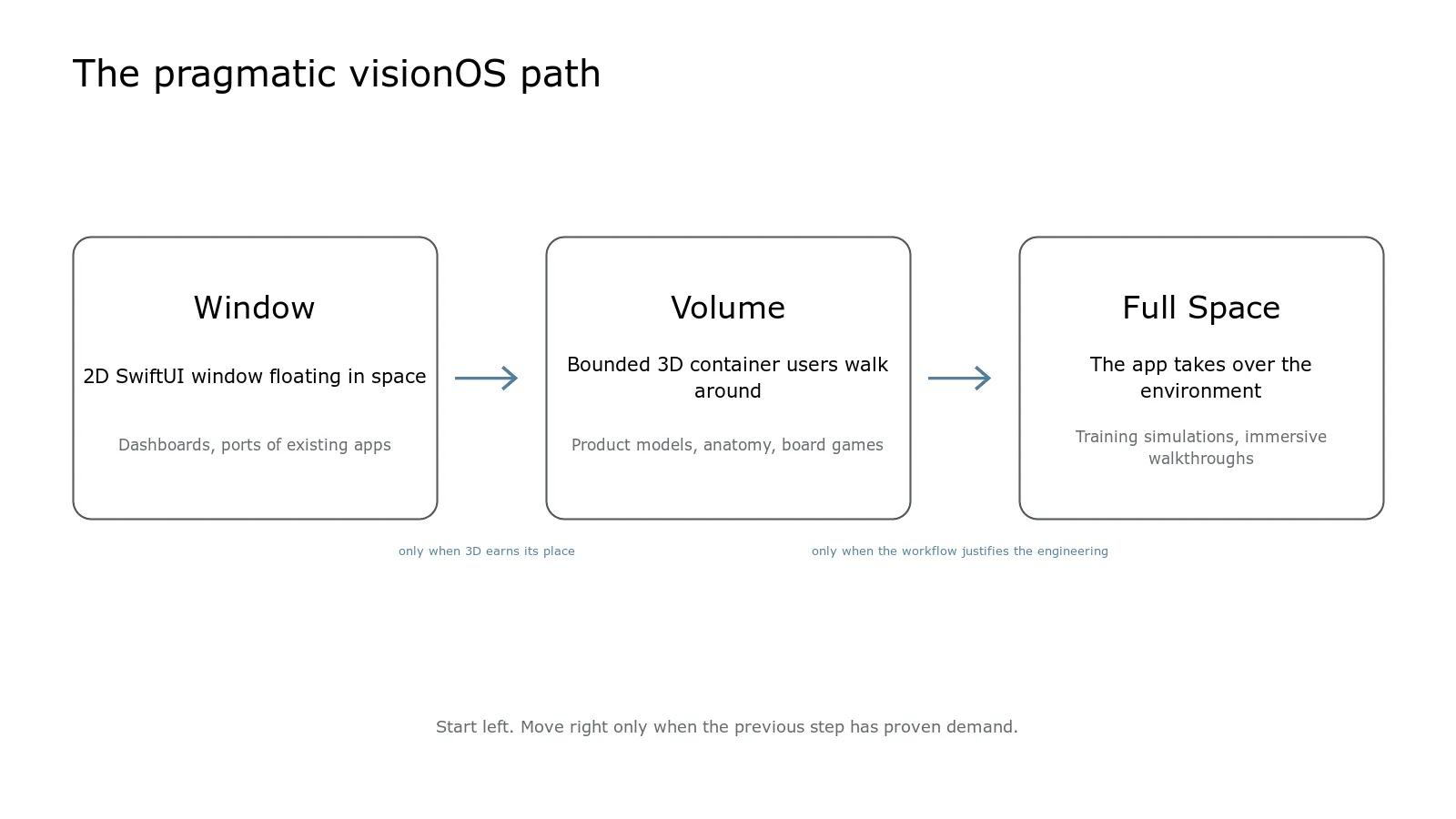
If you have shipped SwiftUI, you are closer than you think. visionOS apps are SwiftUI apps at their core, and Apple's visionOS developer documentation organizes everything around three presentation styles:
| Presentation | What it is | Best for |
|---|---|---|
| Window | A 2D SwiftUI window floating in space | Dashboards, ports of existing apps |
| Volume | A bounded 3D container users walk around | Product models, anatomy, board games |
| Full Space | The app takes over the environment | Training simulations, immersive walkthroughs |
The pragmatic path runs left to right. Start with a window to validate demand, add a volume when 3D earns its place, and reserve full immersion for the workflows that justify the extra engineering.
RealityKit is the 3D engine underneath: entities, materials, physics, spatial audio, and anchoring content to the room. Reality Composer Pro handles scene assembly and asset preparation. You do not need a game engine background to ship a volume-based app, but someone on the team needs to be comfortable thinking in scenes and entities rather than views alone.
Interaction on visionOS is look-then-pinch, not touch-and-swipe. That single change invalidates a decade of mobile UX instinct. Targets need generous hit areas because eyes are less precise than fingertips. Content has to live where necks stay comfortable, which rules out layouts that force users to look up or track fast-moving elements. Apple's Human Interface Guidelines for the platform are unusually specific about depth, scale, and ergonomics, and following them is the difference between an app people use for an hour and one that gives them a headache in ten minutes.
Here is where visionOS app development timelines actually slip. Code estimates hold. Asset estimates do not. Every model needs conversion to USDZ, polygon budgets that respect the device's thermal limits, and materials that read correctly in a user's real lighting. If your client has CAD files, budget real time for cleanup; engineering CAD is wildly over-detailed for real-time rendering. Scope the asset pipeline as its own workstream from day one, with its own owner.
Honest numbers, because most spatial content online avoids them. Our fixed-price engagements run $4,000-$30,000, and spatial projects tend to land in the upper half of that range. The premium is not the Swift code. It is the 3D assets, the interaction design that has no established patterns to copy, and testing on physical hardware, which cannot be fully replaced by the simulator.
A scoped window-plus-volume app that visualizes an existing data set sits near the middle of the range over 4-8 weeks. A full-space training simulation with custom assets and progress tracking pushes toward the top and sometimes beyond it, which is exactly when we say so before kickoff rather than after.
One more cost note: if your spatial app includes AI features, think hard about where inference runs. Headset workflows are latency-sensitive, and shipping every interaction to a cloud model gets expensive. Our guide to on-device AI for privacy-first mobile apps covers when local models beat API calls on both latency and monthly bills.
From the field: the recurring pattern we see across 30+ shipped projects is a team arriving with a demo that impressed everyone in a meeting and fell apart on real data. Spatial computing amplifies this. A headset demo impresses harder than any slide deck ever will, so stakeholders greenlight fast, and then the app meets real CAD files, real lighting, and real eight-hour shifts. Most of the work that matters is reliability engineering after the wow moment, not the wow moment itself.
Treat visionOS as a skills investment with a long payoff curve. SwiftUI remains the foundation, so nothing you learn is wasted if the platform grows slowly. RealityKit, USDZ pipelines, and gaze-and-pinch design are the new additions, and the pool of developers who have shipped all three is still tiny. That scarcity is the opportunity. On the iPhone you are late to every category. On visionOS, most categories still have no serious entrant, and enterprise buyers are actively looking for teams who have done it before.
The sober version of the strategy: keep your revenue base on iPhone and iPad, ship one focused spatial project that maps to a real budget line (training is the safest bet), and let that shipped app become your calling card as the installed base grows.
For consumer apps, rarely; the installed base is still too small to support most B2C models. For enterprise training, simulation, and visualization, yes. Those buyers have budgets tied to expensive physical processes, competition is thin, and a single well-scoped app can justify its build cost in avoided travel or downtime within a year.
Our typical engagement runs 4-8 weeks from kickoff to a working release, matching our standard mobile timeline. The variable is 3D content. If clean USDZ assets exist, timelines hold. If assets must be modeled or converted from engineering CAD, add dedicated asset-pipeline time and treat it as a parallel workstream with its own deadline.
Usually, yes. Most SwiftUI apps run on visionOS as windows with modest adjustment, and that is a legitimate first release. The mistake is stopping there. A floating iPad window gives users no reason to reach for a headset. Plan a second phase that adds a volume or spatial feature only a headset can deliver.
For most business applications, no. SwiftUI plus RealityKit and Reality Composer Pro covers windows, volumes, and immersive spaces with native performance and the shortest learning curve for iOS teams. Unity support exists and makes sense for complex games or teams with existing Unity assets, but it adds licensing cost and a heavier toolchain.
Written by the Codestreaks team and edited by Arsalan Amin. The left-to-right path in the diagram above is ours: it is the sequencing rule we apply when scoping spatial work, and it is why we open most conversations by trying to talk the client down to a window. The engagement shape quoted here, 4-8 weeks at fixed prices between $4,000 and $30,000, is our own published pricing, and the 30+ projects delivered to production since 2024 is our own count.
The platform material is sourced, not measured. The three presentation styles, RealityKit and Reality Composer Pro are Apple's own documentation, linked above. The $3,499 Vision Pro price is Apple's published US price at launch. The observation that asset pipelines rather than Swift code are what slip is a pattern from our delivery work generally, not a timing study.
One thing we do not have, and it is worth saying plainly: Codestreaks has not shipped a visionOS app of its own. There is no App Store listing, no retention number and no client spatial case study behind this post. Where a first-party number would have strengthened a claim, we left the claim qualitative rather than estimating one, and the advice to treat spatial as a skills investment is exactly the position we have taken ourselves.
Drafting is AI-assisted and every draft gets a human editing pass against sources we can point to. This post was updated in September 2026 to add the diagram above and the note you are reading.
If you have a workflow that might justify a headset, the cheapest next step is a conversation, not a prototype. We offer a free 30-minute scoping call where we will tell you honestly whether spatial computing fits your problem or whether a standard mobile build serves you better. We respond within two business days, take on two engagements per quarter, and every client keeps 100% ownership of their code and repo.
Start your project or read more about how we approach mobile app development across iOS, Android, and visionOS.
A serial maker of SaaS products and AI agents, I’ve built and launched 10+ tools, grown products to thousands of users, and taken multiple ventures. I share the process what works, what breaks, and how builders can ship faster and smarter. Previously a data scientist at a Big Four consulting firm.


