

React Native, Capacitor, and Ionic do genuinely different things. Which one fits, where each breaks, and the three questions that settle it in scoping.

You have a web team that writes JavaScript every day, and you need a mobile app. The obvious question is whether those people can build it. The honest answer is yes, mostly, and the places where "mostly" bites are predictable enough to plan around.
We have shipped mobile work both ways at Codestreaks, and across 30+ production projects since 2024 the JavaScript route wins on one specific axis: the second year. Not the build. The build is roughly a wash. What changes is what happens when you need a feature in both stores in the same sprint, eighteen months later, with a different developer.
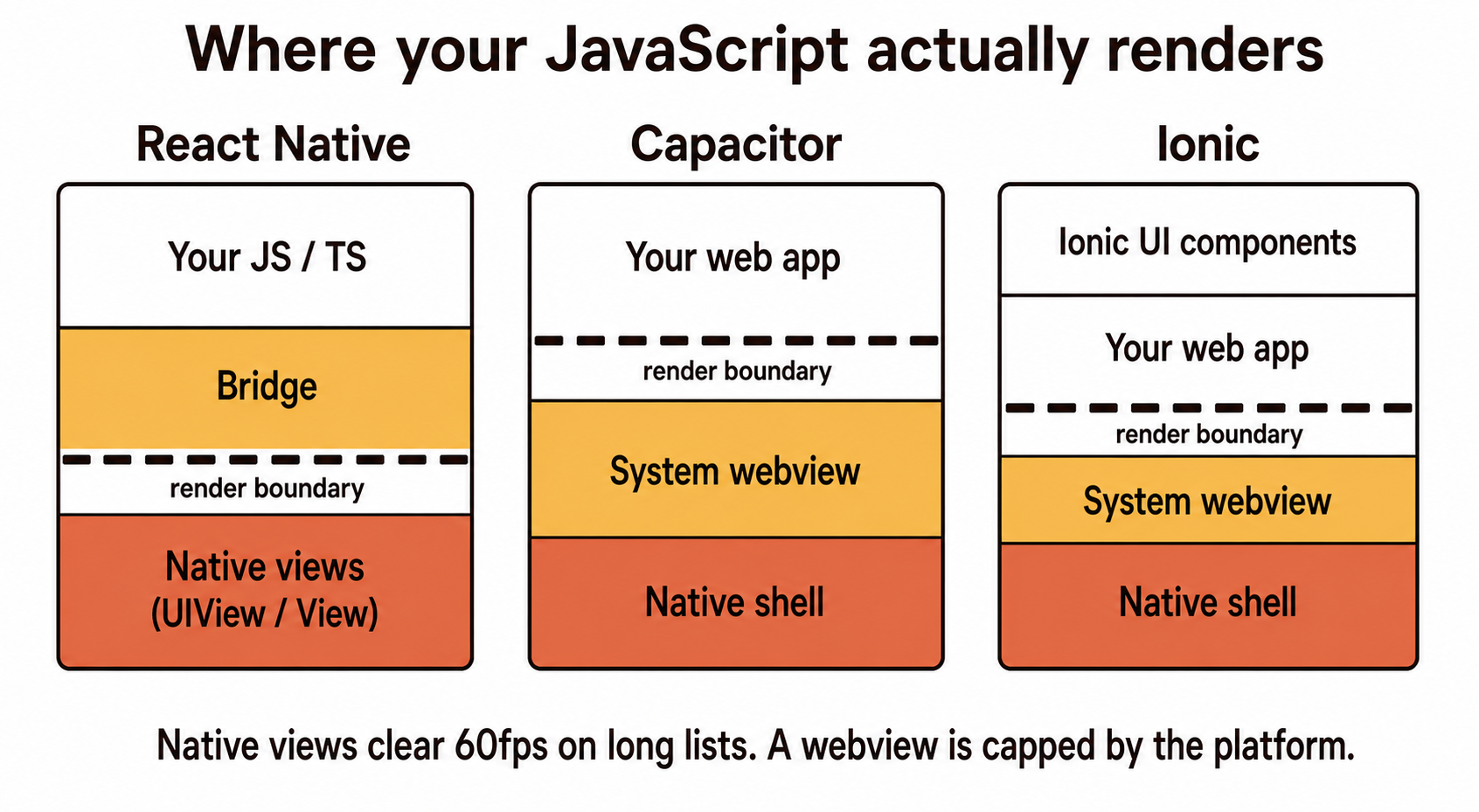
Three things wear the same label, and they are not interchangeable.
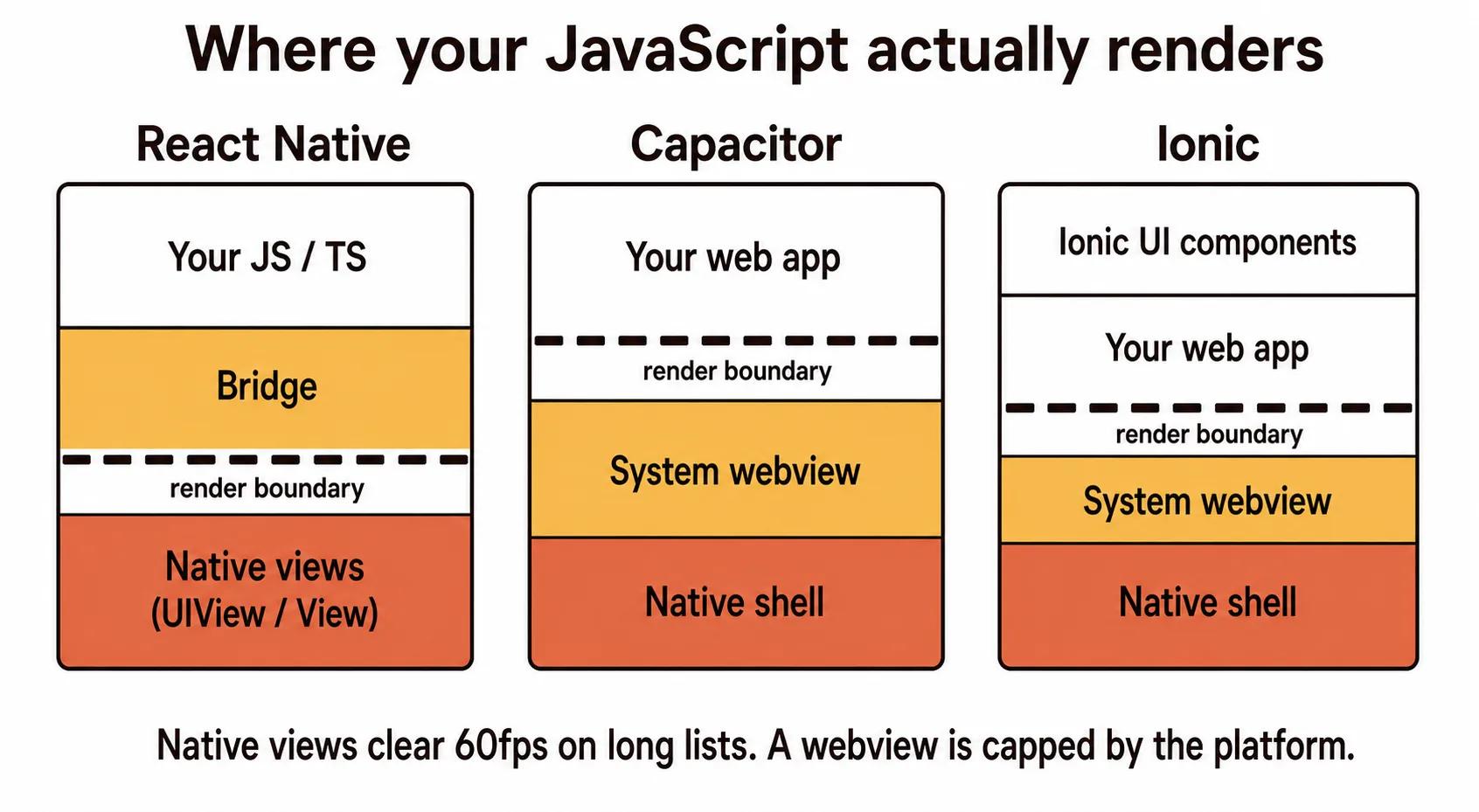
React Native compiles your JavaScript to real native views. A <View> becomes a UIView on iOS and an Android View. There is no browser involved. This is what most people mean.
Capacitor (and its predecessor Cordova) wraps a web app in a native shell with a bridge to device APIs. Your UI is a web page running in a system webview.
Ionic is a UI component library that usually rides on Capacitor, though it can run on React Native. When someone says "we built it in Ionic" they almost always mean a webview app with nice components.
The distinction matters because it determines what your app can never do well. A React Native app can hit 60fps on a complex list because it is driving native views. A webview app is subject to whatever the platform webview gives you, and on mid-range Android that is a real ceiling.
We do not think webview apps are junk. We think they are mispriced by their fans and their critics equally.
A webview app is the right call when the app is mostly forms, lists, and text, when it already exists as a responsive web app, and when your users are on decent hardware. Internal tools fit this perfectly. So do content apps, booking flows, and most B2B portals where the user opens the app twice a week to do one task.
If your existing web app is good and you need it in the stores for distribution rather than for capability, Capacitor can get you there in a fraction of the time and cost. That is a legitimate outcome, not a compromise, and we have recommended it to clients who arrived expecting to be sold something bigger.
Where it stops working: anything with continuous gestures, camera work beyond a simple capture, background processing, or a list that scrolls through thousands of items. Those are the four we watch for in scoping.
React Native is the default we reach for when the app is a real product rather than a wrapper.
The reason is not performance, though performance is fine. The reason is that you get one codebase with real native rendering, which means a designer's spec looks the same on both platforms and a bug fixed on Tuesday is fixed on both stores. For a small team, that is the whole argument. Two native codebases means every feature is scoped, built, reviewed, and QA'd twice, and they drift. They always drift. One platform gets the fix first and the other gets it "next sprint" and next sprint has its own work.
The honest cost of React Native is dependency management. You are one layer above native, and when a native module you depend on has not been updated for a new iOS version, you are the one updating it. Budget for that. It is not frequent, but it is not zero, and it is the thing that surprises teams who expected a pure JavaScript experience.
This is the actual failure mode, and it is not about which framework you picked.
Web developers building their first mobile app tend to assume the network. On the web, a failed request is a spinner and a retry. On a phone, the user walks into a lift, the request dies, the app has no offline state, and their half-completed form is gone. They do not file a bug. They delete the app.
The second assumption is that the app stays open. A mobile app gets suspended, killed, and resumed constantly. If your state lives only in memory, your users will find that out for you.
Neither of these is a JavaScript problem. They are mobile problems that JavaScript developers hit because the web trained them out of thinking about it. We plan for both in the first week now, not because the framework demands it but because skipping it is what actually gets apps uninstalled. This is the same reliability gap we wrote about in our mobile app development process guide.
We do not run a scoring matrix. Three questions settle it almost every time.
Does the app need to feel native, or does it need to be available? Feel native, React Native. Be available, Capacitor is on the table.
Does anything run when the app is closed? Background sync, geofencing, push-triggered work. If yes, you are in React Native or native territory. Webviews do not get to run in the background in any way you can rely on.
Who maintains this in two years? If the answer is "our web team", that is a strong argument for JavaScript regardless of everything above. A technically superior native app that nobody on staff can modify is worse than a good React Native app your team owns.
That third question decides more projects than the first two combined, and it is the one that never appears in framework comparison articles.
A client came to us with a React Native app built by a previous team that was, in their words, "slow". Everyone assumed the framework.
It was not the framework. Their product list rendered every item in a single non-virtualised array, 4,000 items deep, each with an uncached remote image. That code would have been slow in Swift. It would have been slow in assembly. Swapping to a virtualised list and caching the images fixed it in two days, and the app they were about to throw away and rebuild natively for a six-figure sum went on to ship.
We tell that story a lot, because "the framework is slow" is almost always "we rendered four thousand things at once". Prototypes lie the same way. A demo that scrolls beautifully through five hand-picked products tells you nothing about the five thousand real ones, and the gap between those two is where the engineering actually lives.
Being straight about the limits is more useful than defending the choice.
We would not build a real-time video editing app, a serious 3D game, or anything where the core loop is heavy sustained computation on the device. We would not build an app whose entire value is a novel use of a brand new platform API, because you will be waiting for bridge support.
And we would not pick React Native purely to save money on a two-screen app that a native developer could finish in a week. Sometimes the small native thing is just the small native thing. If you are weighing that decision more broadly, our native versus progressive web app comparison covers the distribution side of it.
Yes. React Native compiles JavaScript to real native views and is used in production by apps with tens of millions of users. Capacitor and Ionic take a different route, running your web app inside a native shell. Both are legitimate production choices for the right app.
They solve different problems. React Native renders native views and suits apps that need to feel native or do background work. Ionic on Capacitor renders a web app in a webview and suits form-and-list apps, especially when a good responsive web app already exists. Neither is universally better.
JavaScript or TypeScript for your code. We use TypeScript on every build, because the compiler catches an entire category of bug that would otherwise reach a device. Underneath, React Native still uses Swift and Kotlin for native modules, which you occasionally have to touch.
For typical business apps, users will not be able to tell with React Native. Webview apps have a lower ceiling on animation-heavy or list-heavy screens, particularly on mid-range Android hardware. Most reported slowness in either case turns out to be application code, not the framework.
Usually yes, with one caveat worth taking seriously. The framework will be familiar. The mobile assumptions will not: intermittent networks, suspended apps, store review, and device fragmentation. Pair them with someone who has shipped mobile for the first project and the second one goes fine.
Written by the Codestreaks team. Abdullah, our co-founder, is a senior mobile app developer based in Austin, TX, and the framework calls here reflect what we actually pick when scoping, across 30+ production projects delivered since 2024. The 4,000-item list story is from a real client engagement, retold without naming them. Drafting is AI-assisted with human editing against our own project history. Where we had no direct measurement of our own, we said so instead of citing a benchmark we did not run.
If you have a web team and you are trying to work out whether they can carry the mobile build, that is a good 30-minute conversation. We do those free, and reply within two business days.
More on how we approach builds on our mobile app development service page, or start a project.
A serial maker of SaaS products and AI agents, I’ve built and launched 10+ tools, grown products to thousands of users, and taken multiple ventures. I share the process what works, what breaks, and how builders can ship faster and smarter. Previously a data scientist at a Big Four consulting firm.


