

Custom desktop app development runs $4,000 to $30,000+ with us. It's worth it for three reasons only: hardware access, offline-first, heavy local processing.
Codestreaks Team

Custom desktop application development means building software that runs natively on a user's machine (Windows, macOS, or both) rather than in a browser tab or on a phone. With us, a contained internal tool runs $4,000 to $10,000 over three to four weeks, and a full engineering platform runs $22,000 to $30,000 or more across eight to twelve weeks. In a market where "just build a web app" is the default answer to almost every software question, desktop still wins for a specific, narrow set of reasons, and knowing whether you're actually in that set is the entire decision.
Most teams that ask about desktop development don't need it. A smaller number genuinely do, and building the wrong one, web when you needed desktop, or desktop when a web app would have served fine, is an expensive mistake to unwind six months in.
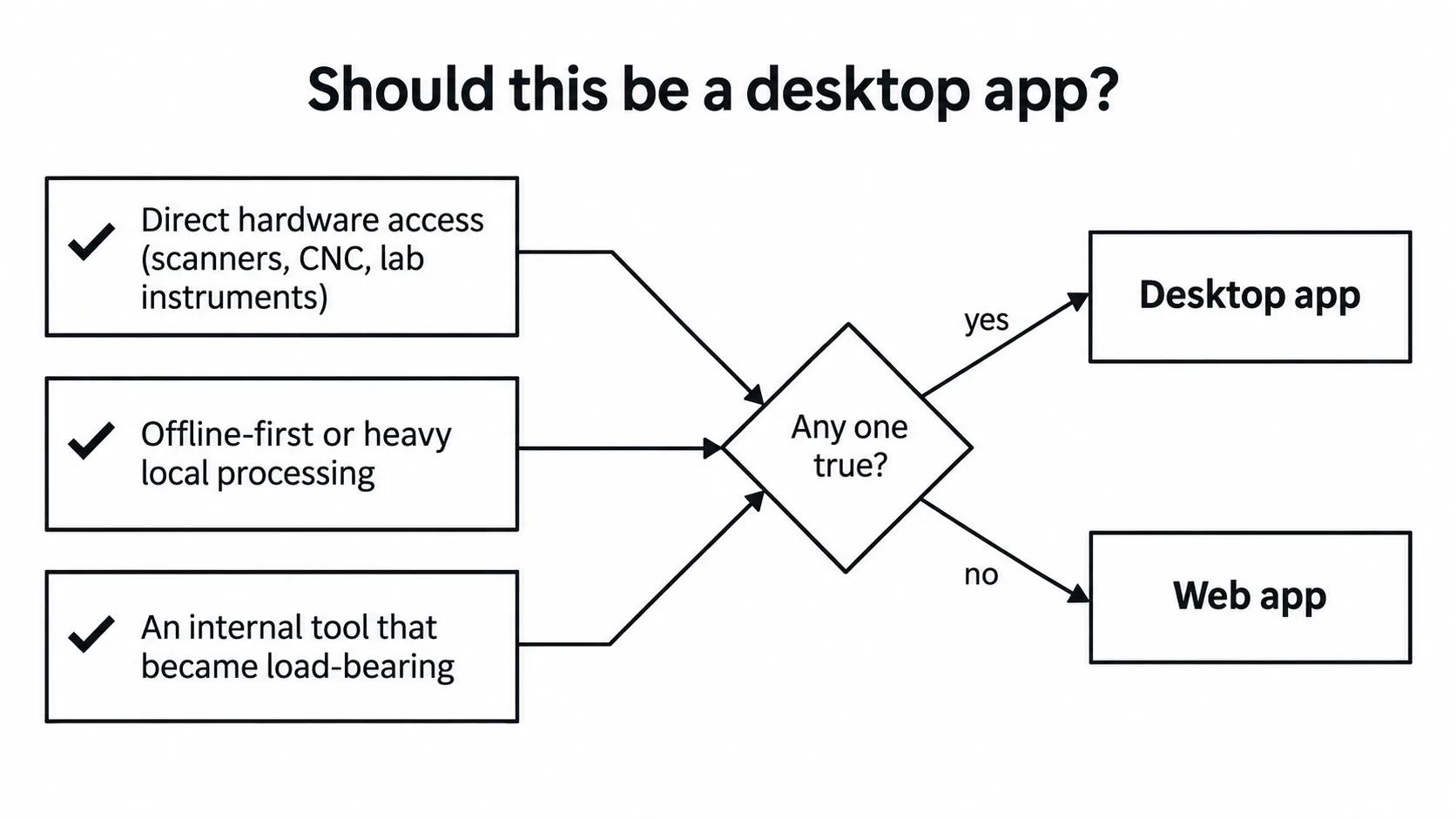
Three conditions decide it, not preference. If any one applies, desktop is the right call; if none do, a web app gets you to a working product faster with none of the installer and update overhead. The next section covers each condition in turn.
Hardware access. If the software needs to talk directly to local hardware, a barcode scanner, a lab instrument, a CNC machine, specialized peripherals, a browser sandbox makes that difficult or impossible without workarounds that are themselves more fragile than a native app. This is the cleanest, least debatable reason to go desktop.
Offline-first, heavy local processing. Applications that need to function with no internet connection, or that process large local files (video editing, CAD, scientific data) faster with direct filesystem and local compute access than a browser can offer, still favor desktop. Progressive web apps have closed some of this gap, but not all of it, especially for genuinely heavy local compute.
Internal tools that started as something load-bearing but informal. This is the reason we see most often in practice, and it's rarely stated as clearly as the first two. A team's actual workflow is running through a spreadsheet with macros, or a chain of no-code automations, until it breaks in a way that costs real money or time, and someone finally asks for it to become real software. We hold this view generally: no-code automation stacks are great until they become load-bearing, then nobody can debug them, and the person who built the original automation has usually left the company. A desktop app is often the right landing spot for that workflow specifically because it's an internal tool with a small, known user base, exactly the case where the deployment simplicity of a browser matters less than the reliability of an owned, testable application.
Desktop projects span a wider cost range than most software categories because "desktop app" covers everything from a small internal utility to a full engineering platform. A contained internal tool replacing an informal spreadsheet-and-macro workflow is closer to our single-purpose project range, $4,000 to $10,000 and three to four weeks. A full engineering platform with multiple modules, real data architecture, and phased rollout sits at the other end, $22,000 to $30,000 or more across eight to twelve weeks, phased. The determining factor isn't "is it desktop" so much as how many distinct workflows the tool needs to support and how much of the underlying data model has to be designed from scratch versus reused from an existing system.
We walk through this same scoping discipline, regardless of platform, in our custom software development process guide, specifically the two stages where most projects actually go wrong: requirements that are vague enough to mean different things to different stakeholders, and a backend data model that gets locked in before anyone stress-tested it against real usage.
Modern cross-platform desktop frameworks (Electron, Tauri, and similar) mean "custom desktop app" no longer requires separate native codebases for Windows and macOS the way it did a decade ago. That's a real cost reduction, and it's why desktop has stayed viable even as web app capability keeps expanding. But it doesn't change the underlying decision: you still need one of the three reasons above to justify desktop over a web app, because a cross-platform desktop shell still costs more to build and distribute (installers, auto-update, code signing) than a web app that ships instantly to every user with a browser.
Teams sometimes reach for desktop because it feels more "serious" or "real" than a web app, not because any of the three actual reasons apply. That instinct is usually wrong. If your users already live in a browser all day and none of hardware access, offline-first, or heavy local processing applies, a web app (which we cover from the buyer's side in our startup web app development guide) gets you to a working product faster, with none of the installer and update-distribution overhead desktop carries.
The framing that actually helps here: don't start the conversation with "should this be a desktop app." Start with what the software needs to actually do, offline access, hardware integration, heavy local compute, or none of those, and let the platform follow from that answer. We hold this view broadly across every kind of software decision: buy the outcome, not a specific technical implementation, because implementations change and the actual job the software does for your team doesn't.
Yes, but only for a specific set of reasons: direct hardware access, offline-first requirements, or heavy local compute that a browser sandbox handles poorly. Outside those three, a web app usually gets you to a working product faster with less distribution overhead.
Modern frameworks like Electron and Tauri let one codebase target both Windows and macOS, which lowers cost compared to fully separate native builds. The underlying decision to go desktop at all still depends on the same three reasons (hardware, offline, local compute), not on which framework you use once you've decided.
It ranges widely by scope. A contained internal tool replacing an informal spreadsheet or automation workflow typically runs $4,000 to $10,000 over three to four weeks. A full engineering platform with multiple modules runs $22,000 or more across eight to twelve weeks, phased.
When the workflow has become load-bearing, meaning the business actually depends on it running correctly, but the tooling behind it is informal enough that nobody besides its original builder can debug it. That gap between "critical" and "maintainable by one person" is the signal to formalize it.
Not necessarily, but offline-first is one of the three legitimate reasons to choose desktop. If your app has no hardware integration and doesn't need offline access or heavy local compute, offline capability alone is rarely enough justification on its own.
Written by the Codestreaks team; drafting is AI-assisted with human editing over our own project pricing and delivery ranges across single-purpose and platform-scale engagements. Cost and timeline figures reflect our own typical delivery data, not industry-wide averages.
If you're weighing desktop against web for an internal tool or a hardware-integrated application, we scope both through the same web development practice and take on two new engagements a quarter. Start a project or book a free 30-minute scoping call, we respond within two business days.


