

Character accuracy is the wrong metric. Straight-through processing rate is the one that decides whether a document pipeline is worth building.

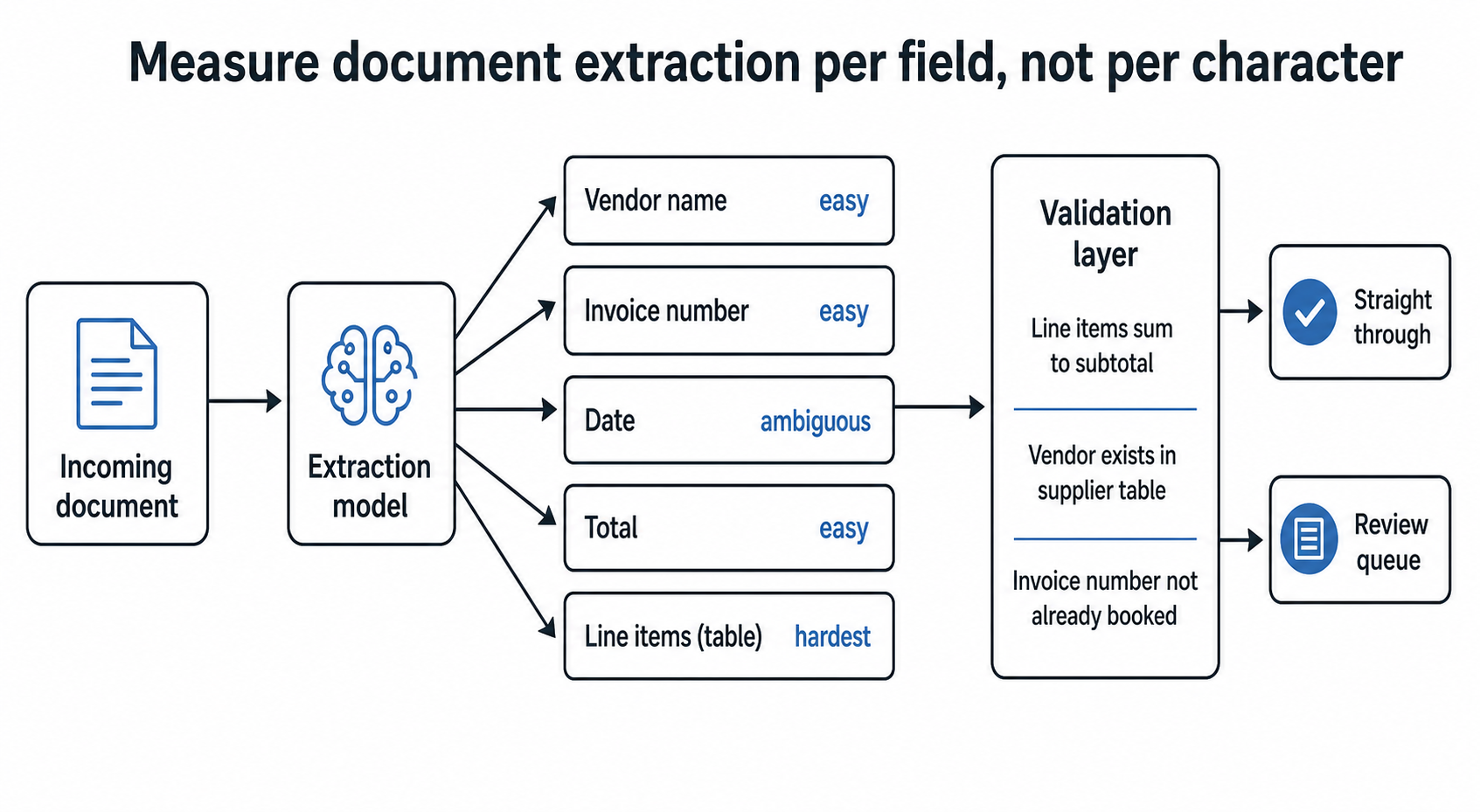
Character accuracy is the wrong metric for document extraction, and it is the one almost every OCR vendor puts on the slide. A system can read 99.2% of characters correctly and still get the invoice total wrong on one document in six, because the digits it fumbled were the ones that mattered.
The metric that decides whether a document pipeline is worth building is straight-through processing rate: the share of documents that go from arrival to a correct record in your system with no human touching them. That number is usually far lower than the OCR score, and it is the only one your operations team will feel.
Measure per field, and measure the fields separately. On a typical invoice pipeline the vendor name, the invoice number, the date, the total, and the line items have completely different difficulty profiles.
Totals are usually easy and high value. Dates are deceptively hard, because 03/04/2026 is two different days depending on which country printed it and the document rarely says which. Line items are the hardest part of the job by a wide margin, because they are a table, and tables break every assumption a text extractor makes about reading order.
Once you score each field on its own, the project plan writes itself. You automate the fields that are reliable, you route the ones that are not, and you stop pretending a single accuracy figure describes the system.
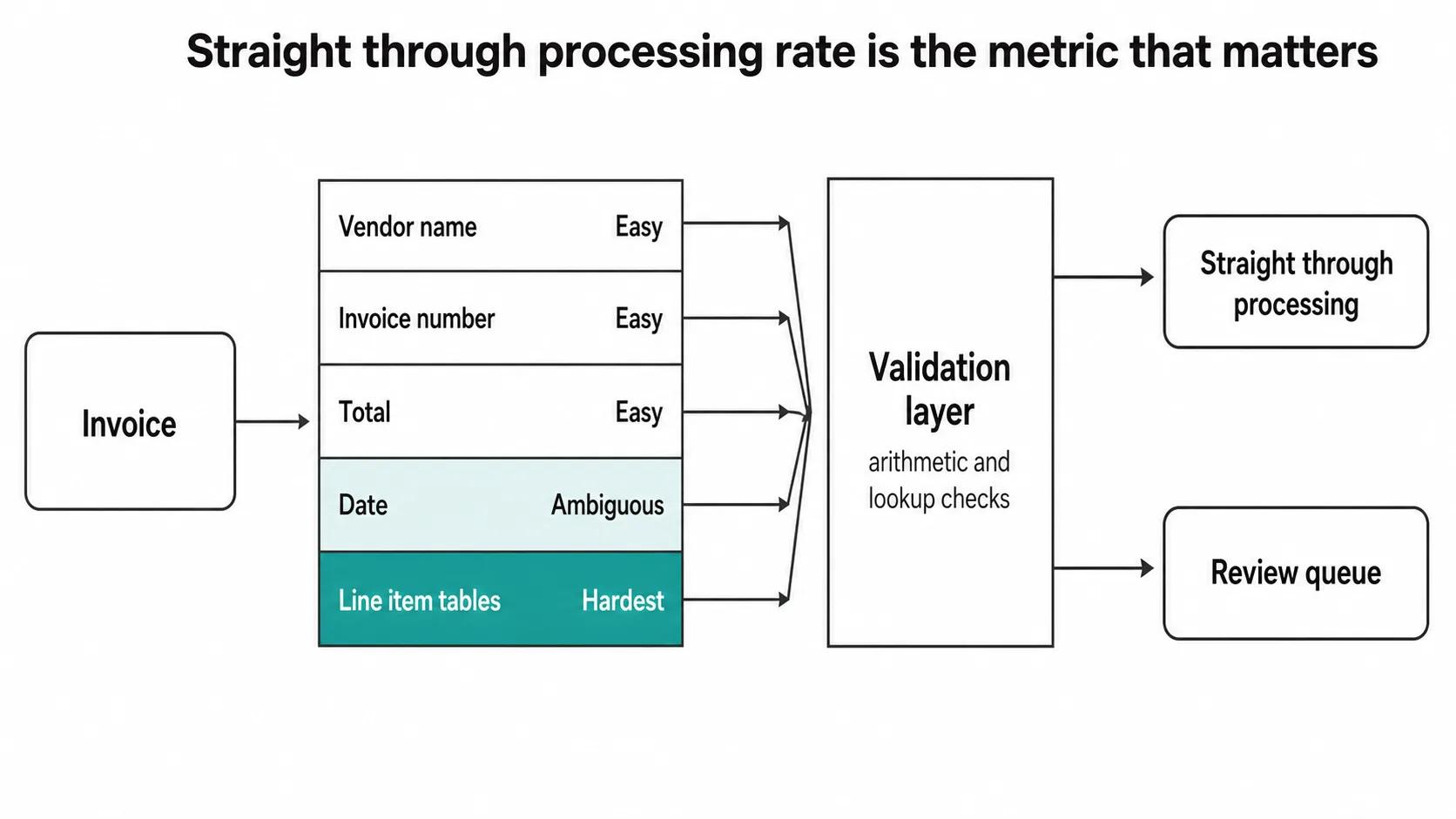
The highest-return component in a document pipeline is usually not the extraction model. It is the layer of arithmetic and lookup checks sitting behind it.
Line items should sum to the subtotal. Subtotal plus tax should equal the total. The vendor should exist in your supplier table. The invoice number should not already be in the ledger. The date should fall inside a plausible window. The purchase order referenced should exist and should not already be fully received.
None of that is machine learning. All of it is cheap. And it catches a class of error that no amount of model improvement will: the confident wrong answer. An extractor that reads 1,240.00 as 7,240.00 does so with high confidence, because the character was legible, it was just wrong. Confidence scores do not save you there. Arithmetic does.
This is why we usually tell clients the interesting engineering in document automation happens after the model returns.
Every document process has a comfortable middle and two ugly tails. The middle is the clean PDF generated by a system you can predict. The tails are the phone photograph taken at an angle in a warehouse, the fax that has been scanned three times, the handwritten annotation in the margin overriding a printed figure, the document in a language nobody planned for.
Automating the middle is easy and it is often 60% to 80% of volume. That is a real result, and it is where the return comes from. The mistake is promising the tails will follow shortly. They usually do not, and the effort to chase them from 80% to 95% typically costs more than the first 80% did.
Plan the exception path as a real part of the product on day one. Where does a failed document go, who looks at it, how fast, and how does their correction get back into the system so the same failure is cheaper next time. Get this right and the review load falls month over month. Get it wrong and you have built a queue that quietly becomes somebody's whole job.
Modern vision-language models read printed text well enough that print extraction is close to a solved problem for most business documents. Several things remain hard and it is worth being blunt about which.
Free handwriting is still unreliable outside of narrow, constrained fields. Checkboxes and ticks are surprisingly error-prone, because a tick, a cross, and a smudge look similar and the semantics invert depending on the form. Stamps and signatures overlapping printed text degrade both. Multi-page documents where a table continues across a page break confuse reading order almost universally. Poor scans of poor photocopies of poor originals remain what they have always been.
If your process depends heavily on any of those, say so during scoping. It changes the straight-through rate you should expect, and therefore the business case, and it is much better discovered before a budget is approved than after.
A single document type with a defined field set, meaning one invoice layout family or one form, sits at the bottom of our $4,000 to $30,000 range: roughly $4,000 to $10,000 across three to four weeks. A full pipeline with several document types, a validation layer, a review queue, and writes into your ERP or accounting system runs $10,000 to $22,000 across five to seven weeks. Multi-entity or multi-language rollouts run $22,000 to $30,000 and up, phased across eight to twelve weeks.
Running cost is low. Document extraction inference typically lands in the $50 to $2,000 a month band alongside our other production systems, and caching plus routing cheap documents to a cheap model cuts that several times over.
The honest cost driver is not the software. It is the ground-truth set: a few hundred real documents, correctly keyed by hand, that you measure everything against. Teams resist paying for that and then have no way to tell whether the system is getting better or worse.
Ask for straight-through processing rate per document type, measured against a held-out set of real documents, with the review queue's throughput reported alongside it. That single pair of numbers tells you what the system does and what it costs you in human time.
Do not accept a character accuracy figure as the acceptance criterion. It is the number that looks best and means least.
If your documents are a standard type, meaning common invoices, receipts, or well-known tax forms, and your volume is modest, a commercial API will beat anything custom on cost and time. Use it. The build case appears when your documents are unusual to your industry, when the validation logic is specific to your business rules, when data cannot leave your infrastructure, or when the extraction has to write into systems with awkward integration surfaces.
That last one is more common than the first three, and it is why a lot of document projects are really integration projects wearing an AI hat. Most teams do not need transformation. They need three boring workflows automated well, and document intake is very often one of them.
For a well-scoped single document type with clean digital inputs, 70% to 90% is a reasonable target. Mixed real-world inputs including photographs and scans typically land lower, often 50% to 75%, with the remainder routed to review. Anyone quoting you 99% without having seen your actual documents is quoting a benchmark, not your process.
Usually not. Pre-trained vision-language models handle most printed business documents out of the box, and the work goes into field mapping, validation rules, and integration. Custom training earns its place with unusual layouts, industry-specific notation, or handwriting in constrained fields.
The extraction models handle major languages reasonably well. The harder parts are locale-dependent: date order, decimal separators, and tax field names differ by country and silently corrupt data if assumed. We treat locale as an explicit field to detect rather than a setting to configure.
Yes. Document pipelines are one of the more common on-premise deployments we build, usually because the documents contain personal or financial data that is not permitted to leave the environment. It constrains model choice and raises the hardware line, and it is entirely workable.
Written by the Codestreaks team. The price bands and the inference cost range are our own published figures, drawn from production systems we build and operate. The per-field measurement approach, the validation-layer argument, and the exception-path design described here are how we scope document work, and the failure modes listed are ones we have hit on real client documents, retold without naming the client. Drafting is AI-assisted with a human editing pass over our own project record.
Send us twenty real documents, including the worst ones you have, and we can usually tell you on a call what straight-through rate is achievable and whether an off-the-shelf API already does the job. We will say so if it does. Free 30 minutes, reply within two business days.
More on how we build these on our computer vision development service page, or start a project.
Related reading: why your demo's accuracy is not your accuracy, what process automation actually is, and where automation holds up in insurance.
A serial maker of SaaS products and AI agents, I’ve built and launched 10+ tools, grown products to thousands of users, and taken multiple ventures. I share the process what works, what breaks, and how builders can ship faster and smarter. Previously a data scientist at a Big Four consulting firm.


