

Digital process automation connects systems, not just tasks. Here's what separates it from RPA and why that distinction determines what you can actually automate.
Codestreaks Team

Your ops team is copying data between three systems at 2am because the incident management tool doesn't talk to the ticketing system, which doesn't talk to the notification service. You've heard "automate it" a dozen times. The question is how.
Digital process automation (DPA) orchestrates end-to-end workflows across multiple systems, people, and decisions. Unlike robotic process automation (RPA), which mimics human clicks inside a single application, DPA connects systems at the API level and routes work based on logic, approvals, and exceptions. RPA automates a task. DPA automates a process.
The distinction matters because it determines scope. RPA breaks when the UI changes or the logic gets complex. DPA scales with your actual workflow.
RPA tools record your clicks and replay them. That works for copying invoice data from an email into an accounting system, assuming the email format never changes and every invoice is valid. The moment you need conditional routing (escalate invoices over $10K to a second approver) or cross-system orchestration (update the CRM, notify Slack, create a Jira ticket), RPA becomes a maintenance problem.
We've rebuilt three RPA implementations in the last two years. The pattern is identical every time: a demo that worked on clean data, six months of edge-case patches, and a breaking change in the vendor UI that kills the bot. The team that built it has moved on. Nobody can debug it.
Digital process automation solves this by treating the workflow as code. You define states, transitions, and integrations explicitly. When Salesforce changes an API endpoint, you update one integration layer. When business logic changes, you adjust the routing rules. The workflow doesn't break because a button moved.
A digital process automation platform handles three things RPA can't:
Cross-system orchestration. Your customer support process spans Zendesk, Stripe, Salesforce, and Slack. DPA connects them with a single workflow definition. When a high-value customer opens a ticket, the system checks their subscription tier in Stripe, pulls account history from Salesforce, assigns the ticket in Zendesk based on SLA rules, and posts a summary to your #urgent-support channel. One trigger, four systems, zero manual handoffs.
Human-in-the-loop approvals. Not every decision can be automated. DPA workflows pause for human input when needed, then resume automatically. A refund request under $100 processes immediately. Over $100, it routes to a manager. Over $1,000, it escalates to finance. The workflow knows who approved what and when, which matters when audit season arrives.
Exception handling that doesn't fail silently. RPA bots break and log an error. DPA workflows catch exceptions, retry with backoff, fall back to manual steps, and notify the right person with full context. We cover reliability patterns in our process automation guide.
In practice, digital transformation means replacing manual coordination with software-driven coordination. Business process management (BPM) is the discipline of defining, measuring and improving those processes. DPA is the intersection: BPM tells you which process to fix, DPA gives you the tools to fix it.
Most companies have already mapped their processes. Swim lane diagrams, BPMN flowcharts, documentation nobody reads. The maps exist, the automation doesn't. DPA platforms turn those maps into running software, and the analytics layer shows you where bottlenecks actually are rather than where you assume they are. Typical engagement for us is 4 to 8 weeks from kickoff to live deployment, and the first pass usually surfaces two processes you didn't know existed.
Every DPA platform markets itself as low-code or no-code. That's true for the happy path. Edge cases, custom integrations, and anything involving legacy systems require real code. Evaluate platforms on three criteria:
Integration breadth. How many pre-built connectors exist, and how hard is it to build a custom one? A platform with 500 SaaS integrations and no way to connect your internal ERP is useless. This is the criterion that most often decides the budget, so it gets its own section below.
Workflow complexity ceiling. Can the platform handle parallel branches, nested loops, and dynamic routing? Most marketing automation platforms call themselves DPA but choke on anything more complex than if-then-else. Push the vendor for examples three levels deeper than your initial use case.
Observability and audit trails. When a workflow fails, can you see exactly which step broke and why? When compliance asks who approved a transaction, can you answer in two minutes? If the platform doesn't log every state transition with full context, you're building a black box.
Our clients typically budget $4,000 to $30,000 for a DPA implementation, depending on complexity. Single-purpose workflows (onboarding automation, approval routing) land in the $4K to $10K range and ship in 3 to 4 weeks. Multi-step orchestration across a few systems runs $10K to $22K over 5 to 7 weeks. Full platform builds run $22K to $30K and take 8 to 12 weeks, usually phased.
Production costs matter too. Workflow execution is cheap (API calls and compute), but integration maintenance is ongoing. Budget $500 to $2,000 per month for a mid-complexity automation, more if you're hitting rate limits or processing heavy data volumes.
The question buyers actually ask is not how much, but whether the number holds. Three pricing models are in play and they fail in different places.
Flat implementation fee. What we quote. Scope is fixed up front, overruns are ours.
Per-seat licensing. Predictable until the automation works. Adoption spreads and your licence count tracks headcount instead of usage.
Per-execution pricing. The one that surprises people. The vendor bills per workflow run, sometimes per step inside it. A purchase-order workflow we built for a manufacturing client runs 200 times a month, which costs almost nothing. Wire that same workflow to every inbound EDI message and the execution count moves by orders of magnitude while the workflow itself is unchanged. Model volume at production scale, not pilot scale, before signing per-execution.
The costs that arrive after signature are rarely the licence. Budget $500 to $2,000 per month for a mid-complexity automation, and expect most of it to be integration maintenance rather than compute. Running a workflow is cheap. Keeping six API connections alive through other people's version changes is not, and that needs developers whatever the no-code marketing says.
Vendors answer this with a connector count. That number describes the easy part of your integration work and says nothing about the part that overruns. Two capabilities hide behind one marketing word.
Prebuilt connectors are packaged authentication plus endpoint mappings for a product the vendor already knows: Salesforce, Stripe, Zendesk, Slack, NetSuite. They genuinely reduce setup complexity.
API management is what you get when no connector exists. Register an arbitrary API once, with credential storage, token refresh, rate limiting, retry policy and versioning, then reference it from any workflow. This decides what your internal ERP costs to connect, and it is rarely shown in a demo.
Roughly how the platforms sort: Workato, Boomi, MuleSoft and Tray treat API management as a first-class product alongside their connectors. UiPath, Automation Anywhere and Pega carry deep connector catalogues with lighter custom-API tooling. Temporal and n8n hand you the API layer and expect you to build it.
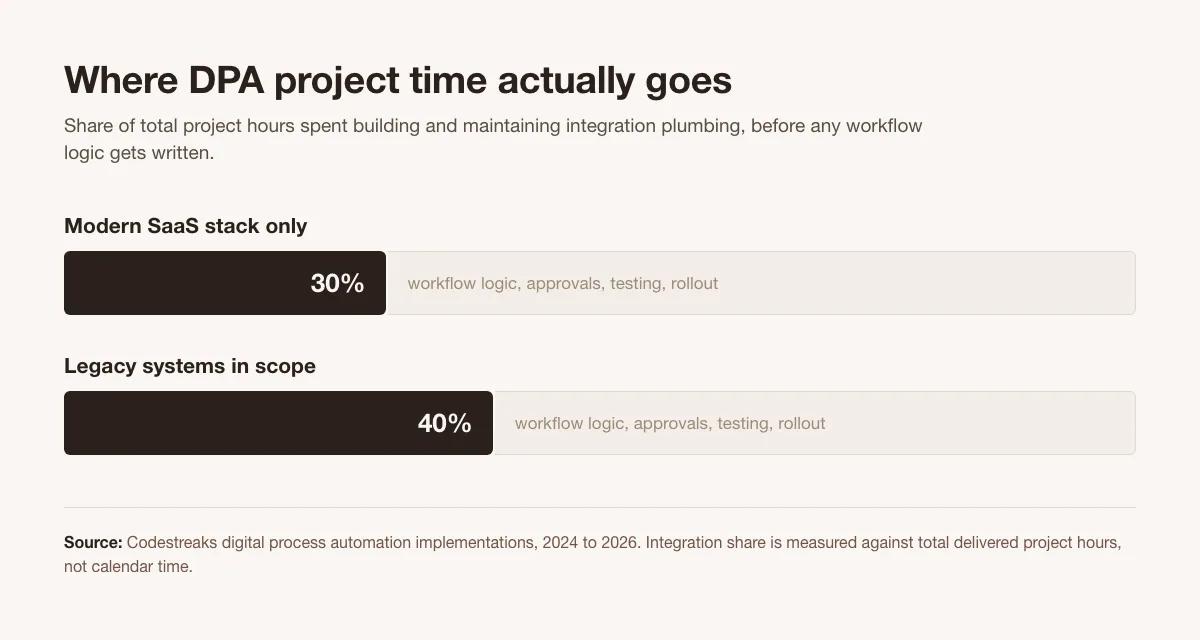
Integration plumbing runs 30% of project hours on a clean SaaS stack and 40% once legacy systems are in scope. Those extra 10 points cannot land on the connector side, because connectors for a 1990s ERP do not exist. They land on API management. So do not count connectors during a trial. Hand the vendor a system they have never heard of and watch.
Abdullah spent his career shipping mobile and web software before co-founding Codestreaks with Arsalan Amin, an ex-data scientist with Big Four consulting experience. Across those projects, the same pattern kept showing up: capable teams losing hours weekly to manual workflows that a bit of real software could absorb. Codestreaks exists to close that gap.
The 2am support pattern is the clearest example. Ops teams doing triage by hand at night because the tool doesn't talk to the other tool. That gap is usually one integration and one agent away from gone. We've eliminated hundreds of hours of monthly coordination overhead with automation that cost less than one engineer's quarterly salary.
If your team is spending more time routing work than doing work, you have a DPA problem.
From a technical perspective, DPA platforms are workflow engines with integration frameworks. The workflow engine manages state machines. Each process instance tracks where it is, what data it holds, and what happens next. When a step completes, the engine evaluates transition conditions and routes to the next state.
The integration framework sits beside it, defined once per system and referenced from any workflow, as described above.
Modern DPA solutions add AI for unstructured data. A purchase order arrives as a PDF. An AI model extracts line items, amounts, and vendor details. The workflow validates against your procurement system, routes for approval based on amount and category, and updates your ERP when approved. We built this exact system for a manufacturing client. It processes 200 POs per month with 94% straight-through rate and zero manual data entry.
Not every workflow needs a platform. If you're automating five steps inside one application with no external systems, RPA or a simple script is fine. If the process runs twice a month, a checklist might be faster than automation.
DPA makes sense when:
We turn down projects where the automation would cost more than the coordination overhead it eliminates. Most teams don't need AI transformation. They need three boring workflows automated well. Our AI workflow automation guide covers when to add intelligence and when simpler automation is the right call.
Different industries automate different processes, but the patterns repeat:
Healthcare and insurance: patient intake, claims, prior authorization. Compliance-heavy, approval-heavy, and almost always tied to a legacy system. Our banking automation guide covers the same regulatory patterns in financial services.
Manufacturing and industrial: order-to-cash, procure-to-pay, production scheduling. ERP-centric, with IoT inputs.
Professional services: onboarding, project kickoff, billing. Document-heavy, with approval chains.
The technology is identical. The business rules differ.
You can build workflow automation with open-source tools (Temporal, Airflow, n8n) or buy a commercial platform (UiPath, Automation Anywhere, Pega). Build gives you control and flexibility. Buy gives you pre-built integrations and vendor support.
The decision point is integration breadth. If 80% of your workflow connects to mainstream SaaS tools, a commercial platform probably has the connectors you need. If you're integrating proprietary systems, custom APIs, or legacy infrastructure, you're building custom integrations either way.
We recommend hybrid: buy the workflow engine, build the integrations. That gives you a supported platform for orchestration and full control over the connection layer.
One opinion we actually hold: no-code automation stacks like Zapier and Make are great until they become load-bearing. Then nobody can debug them, and the person who built the zap has left. If the workflow is critical, treat it like code. Version control, testing, documentation, the full software lifecycle.
RPA automates repetitive tasks within a single application by mimicking human clicks and keystrokes. Digital process automation orchestrates end-to-end workflows across multiple systems using APIs, conditional logic, and human approvals. RPA is task-level automation. DPA is process-level automation.
Implementation runs $4,000 for a single-purpose workflow to $30,000 for a multi-system platform, over 4 to 8 weeks. Operation costs $500 to $2,000 per month. The pricing model matters more than the headline number, which the pricing section above covers.
Yes, but it requires custom integration work. Most DPA platforms offer pre-built connectors for modern SaaS applications. Legacy systems typically require API wrappers, database connectors, or file-based integration patterns. Budget 30% to 40% of project time for integration development when legacy systems are involved.
You need technical expertise to build and maintain DPA workflows, despite vendor marketing about no-code capabilities. Simple workflows work in visual builders. Complex logic, error handling, custom integrations, and production reliability require developers. Plan for ongoing technical ownership.
Start with high-frequency, multi-system workflows where coordination overhead is measurable. Good candidates: customer onboarding, support ticket routing, approval processes, data synchronization between systems. Avoid automating processes that change frequently or run infrequently unless compliance requires it.
Written by the Codestreaks team and edited by Arsalan Amin. The cost bands and the $500 to $2,000 monthly operating range are our own published fixed prices, not industry averages. The 30% and 40% integration figures are measured against total delivered project hours across our own implementations from 2024 to 2026. The 200 purchase orders per month and 94% straight-through rate come from a real client system we built. Drafting is AI assisted, with a human editing pass against real project data before it ships.
Updated 12 September 2026: added the pricing-model and API-management sections, corrected three cost bands still showing pre-August 2026 rates, and added the chart.
We've shipped 30+ automation projects to production since 2024. Every client gets 100% code ownership, 30 days of post-launch support, and a fixed-price engagement scoped up front.
Book a free 30-minute scoping call. We respond within two business days and deliver a written scope with timeline and fixed price. No fake urgency, no fake scarcity. We take on two engagements per quarter and say no when scope doesn't fit.
Start your project or see our AI automation services.