

ADA compliance for mobile apps in 2026: what the DOJ rules require, WCAG 2.2 mapped to iOS and Android, lawsuit stats, and a practical checklist.


Yes, the ADA applies to mobile apps. US courts and the Department of Justice treat apps run by businesses open to the public as places of public accommodation under Title III, and WCAG 2.2 Level AA is the de facto technical standard. This guide covers the legal reality, the lawsuit data, and a practical checklist.
The Americans with Disabilities Act was written in 1990, long before the App Store existed. It never mentions mobile apps by name. That gap has been filled by two forces: federal courts and the Department of Justice, and by 2026 both point the same direction.
On the court side, the landmark case is Robles v. Domino's Pizza. A blind customer could not order a pizza through Domino's website or app using a screen reader. The Ninth Circuit ruled in 2019 that the ADA applies to the website and app of a place of public accommodation, and the Supreme Court declined to hear Domino's appeal. Since then, plaintiffs' firms have treated inaccessible apps as standing targets.
On the regulatory side, the DOJ published a final rule in 2024 under Title II of the ADA that explicitly requires state and local government web content and mobile apps to conform to WCAG 2.1 Level AA, with the first compliance deadline landing in April 2026. You can read the rule and its fact sheet directly on ADA.gov. Title II covers government entities, not private businesses, but it matters to you for two reasons. First, it is the clearest signal yet of what the DOJ considers the technical baseline. Second, courts and settlement agreements routinely borrow that baseline when evaluating private apps under Title III.
So the practical position for ADA compliance in 2026 is simple. If your app serves the public, treat WCAG Level AA as the standard you will be measured against, because that is exactly what a plaintiff's expert witness will do.

Constantly. Digital accessibility litigation has run at more than 4,000 federal and state lawsuits per year in the US for several years, and the targets are not just Fortune 500 brands. Small e-commerce companies, restaurants, clinics, and gyms get named because they are less likely to fight and more likely to settle.
The economics favor the plaintiff. Most cases settle for tens of thousands of dollars, which is cheaper than litigating, so businesses pay and move on. Add your own legal fees, the emergency remediation work done under deadline pressure, and the reputational hit, and an inaccessible checkout flow becomes one of the most expensive shortcuts in your codebase.
The most common violations we see named in complaints map to a short list:
None of these are exotic. Every one of them is preventable with standard platform APIs and a testing habit.
WCAG is written for the web, which confuses mobile teams. The W3C's WCAG 2.2 specification is still the reference document, and its success criteria translate cleanly to native mobile. Here is the mapping we use on client projects.
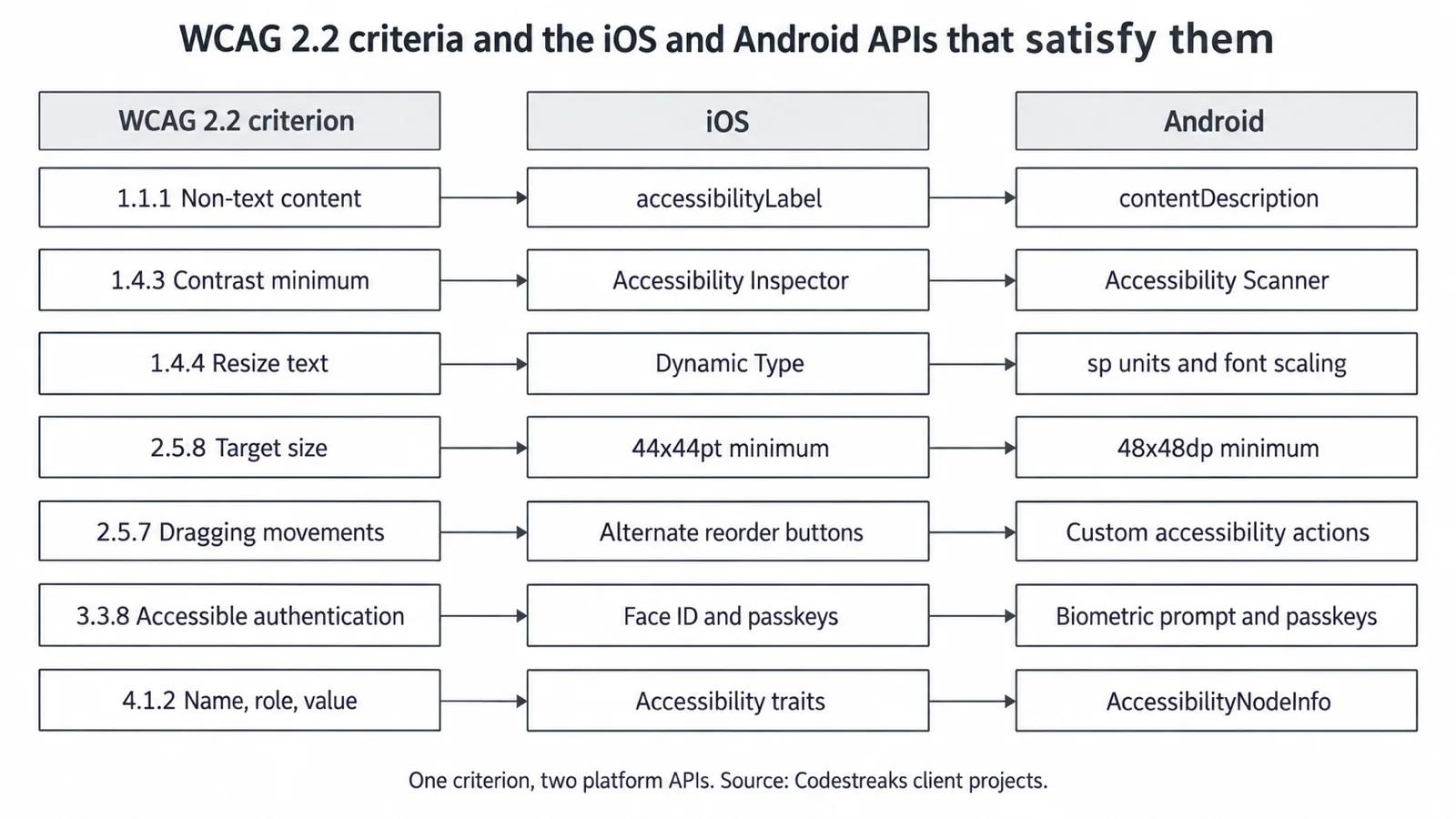
| WCAG 2.2 criterion | What it requires | iOS implementation | Android implementation |
|---|---|---|---|
| 1.1.1 Non-text content | Text alternatives for images and icons | accessibilityLabel | contentDescription |
| 1.4.3 Contrast (minimum) | 4.5:1 for normal text, 3:1 for large text | Verify with Accessibility Inspector | Verify with Accessibility Scanner |
| 1.4.4 Resize text | Text scales without loss of function | Dynamic Type | sp units + font scaling |
| 2.5.8 Target size (minimum) | Interactive targets at least 24x24 CSS px (44pt/48dp is the platform norm) | 44x44pt minimum | 48x48dp minimum |
| 2.5.7 Dragging movements | Drag actions have a single-tap alternative | Alternate buttons for reorder/swipe | Same, plus custom accessibility actions |
| 3.3.8 Accessible authentication | No memorization-only login puzzles | Face ID / passkeys / autofill | Biometric prompt / passkeys / autofill |
| 4.1.2 Name, role, value | Controls expose what they are and their state | Accessibility traits | Semantics / AccessibilityNodeInfo |
Two notes on this table. WCAG 2.2, published in 2023, added the target size and accessible authentication criteria, both gifts to mobile users. And while the DOJ's Title II rule cites WCAG 2.1, building to 2.2 costs almost nothing extra and covers you for the next rulemaking cycle.
If you are building cross-platform, the same rules apply. Flutter and React Native both expose semantics APIs; they just make it easier to forget them because one unlabeled custom widget ships to both platforms at once.

This is the checklist we run on every build before release. It takes a competent team a few days on a mid-sized app, not months.
Compliance-heavy verticals need to go further. If you handle patient data or serve older user bases, accessibility overlaps with your regulatory posture, which we cover in our guide to healthcare mobile app development.
The legal argument gets accessibility budget approved. The business argument is why you should have wanted it anyway.
More than 61 million adults in the United States live with a disability, a market larger than the population of most countries, and one that includes the fastest-growing segment of app users: people over 65. An app they cannot use is revenue you handed to a competitor.
Accessibility also compounds with discoverability. The same structure that helps a screen reader parse your app helps search and App Store algorithms understand it. Clear headings, labeled elements, sensible metadata, and captioned media are exactly what semantic search rewards. An accessible app is, by definition, a better-indexed app.
Finally, every accessibility improvement is a usability improvement for everyone. Bigger touch targets help commuters on a moving train. Captions help the 80% of people who watch video muted. High contrast helps anyone outdoors in sunlight. This is why accessibility requirements show up in every serious enterprise mobile app development RFP now: procurement teams learned that inaccessible software generates support tickets, lawsuits, and rework.
The pattern we see from the field is always the same, and it mirrors the recurring story of our client work in general. A team arrives with an app that impressed everyone in the demo meeting. Then it meets reality. With AI products, reality is messy production data. With accessibility, reality is the first user who navigates by VoiceOver, and the demo that looked polished turns out to be a wall of unlabeled buttons. Most of our work is not building the first version of a screen. It is making that screen survive contact with real users, and users with disabilities are real users.
The root cause is treating accessibility as a QA task at the end of the project. By then, the design system has baked in low-contrast grays, custom controls have no semantics, and retrofitting costs 3-5x what building it in would have. The fix is boring and effective: put accessibility criteria in the definition of done, run the automated scanners in CI from sprint one, and do a manual screen reader pass on every feature before it merges. Accessibility done continuously is cheap. Accessibility done under a demand letter deadline is not.
If your app is part of a business open to the public, yes in practice. Courts, including the Ninth Circuit in the Domino's case, have applied ADA Title III to apps, and the DOJ has consistently taken that position. Government apps are explicitly covered by the 2024 Title II rule. There is no private-app exemption you can safely rely on.
WCAG 2.1 Level AA is the floor the DOJ wrote into regulation, and WCAG 2.2 Level AA is the current W3C recommendation. Build to 2.2 AA. The delta between the two versions is small, mobile-relevant (target size, accessible authentication), and it positions you ahead of the next regulatory update rather than behind it.
Built in from the start, accessibility adds low single-digit percentages to a project budget, mostly testing time. Retrofitting an existing app typically runs from a few thousand dollars for labeling and contrast fixes to significant rework if custom UI components need rebuilding. Either way it is cheaper than one settlement plus emergency remediation.
No. Overlays attempt to patch accessibility at runtime and consistently fail real screen reader testing. Companies using them still get sued, and plaintiffs' firms increasingly call them out in complaints. Native accessibility APIs, correct semantics, and human testing are the only approach that holds up technically and legally.
Combine automated and manual testing. Run axe DevTools, Google's Accessibility Scanner, and Xcode's Accessibility Inspector in your pipeline, then manually complete core journeys with VoiceOver and TalkBack, at maximum text scaling, and with reduce-motion enabled. Before major releases, pay users of assistive technology to test the real flows. Document everything; the audit trail matters if you are ever challenged.
Written by the Codestreaks team and edited by Arsalan Amin. The WCAG-to-platform mapping in the table and diagram above is ours, the checklist we apply on client mobile builds where WCAG 2.2 AA is a default requirement rather than an add-on, across 30-plus projects delivered since 2024. The engagement shape quoted below, 4-8 weeks at fixed prices between $4,000 and $30,000, is our own published pricing.
The legal material is sourced, not measured. Robles v. Domino's Pizza is the Ninth Circuit's 2019 ruling. The Title II web rule was published by the DOJ in 2024, is linked above at ADA.gov, and carries its first compliance deadline in April 2026. WCAG 2.2 was published by the W3C in 2023. The count of more than 4,000 digital accessibility lawsuits a year comes from public litigation trackers and is not a number we produced. All of it was re-read and date-checked in September 2026.
One thing we do not have, and it is worth saying plainly: Codestreaks has published no accessibility audit of its own. No screen-reader pass rate across our shipped apps, no contrast-failure count, no remediation-cost figure from our own engagements. Where such a number would have strengthened a claim here, we kept the claim qualitative rather than estimating one.
Drafting is AI-assisted and every draft gets a human editing pass against sources we can point to. This post was updated in September 2026 to add the diagram above and the note you are reading.
Accessibility work fits inside normal delivery when it is scoped honestly. We build mobile apps with WCAG 2.2 AA as a default requirement, not an add-on, across our mobile app development services, with typical engagements running 4-8 weeks at fixed prices between $4,000 and $30,000. We have delivered 30+ projects to production since 2024, and every client gets 100% code ownership, so your compliance posture never depends on a vendor.
If you want a second pair of eyes on your app's exposure, book a free 30-minute scoping call and we will walk through your core flows against the checklist above. We respond within two business days, and we take on two engagements per quarter, so if the fit is not right we will tell you straight. Start your project here.
A serial maker of SaaS products and AI agents, I’ve built and launched 10+ tools, grown products to thousands of users, and taken multiple ventures. I share the process what works, what breaks, and how builders can ship faster and smarter. Previously a data scientist at a Big Four consulting firm.


